- Layout Creation
-
First essential step to produce a report is to create a report layout. Ensure the HTML report layout file is XML compliant, in another word, it's XHTML compliant. All HTML element must be written in lowercase and closed accordingly. For instance, <td> must be followed by </td> after typing its content, rather than leaving it open and starting another <td>. A line break shall looks like <br/> and horizontal break shall be <hr/>.
- Data Linking
-
Second step of linking process involved adding tags into layout, and adding linkage to report module.
- Server Archiving
-
Final step is on server side configuration, which involves calculating data and specifying the timer for archiving. It is S.I. engineer's role to make the data available in server memory, whether to poll the data from external source or a result of calculations.
Archiving or saving into disk is a commonly needed feature. It can be done manually by end user on GUI during runtime, or automatically archived/generated based on preset timer.
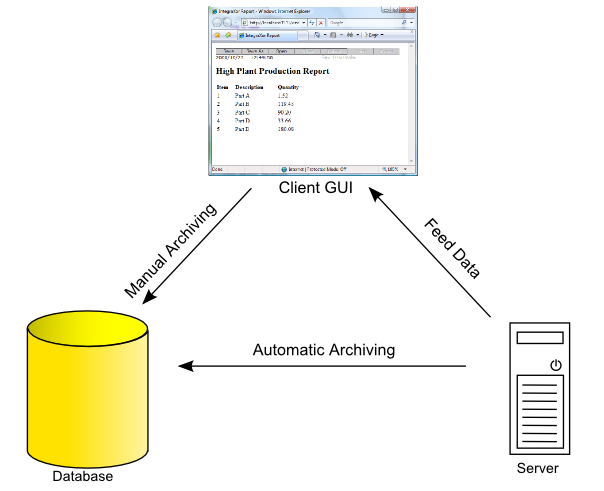
Manual and Automated Report Archiving Architecture
Contact form

![[Tip]](images/tip.png) Tip
Tip