- Animation Engine
-
A SVG graphic layer must not be named as 'image' in Inkscape SAGE as it will be conflicting with the system keywords during runtime.
- Auto Fit is off-centered
-
Any SVG layer must not be manually "transformed", otherwise the SVG mimic will appeared out of center during runtime.
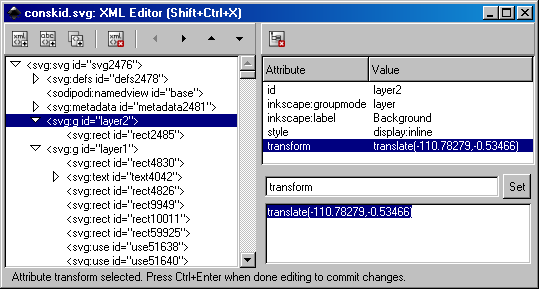
Entering any transform setting will results in off-centered screen during runtime. Value for 'transform' at right bottom shall be deleted.
- SAGE - Clone
-
Do not use for graphic object that need to be animated if Google Chrome is one of the targeted browser. Animation behaviour for GC on cloned graphic object is unpredictable.
- Firefox - Cache
-
Firefox is a popular development platform, however, engineer must be aware that most browsers including Firefox will try to cache browsing data. If update can't be seen after making changes, simply use another browser to double confirm. Also try to press Ctrl+F5 for forceful refresh. Otherwise please learn how to clear cache.
During development, engineer could view the page being developed directly by entering the full path: http://localhost:7131/job/page.htm?YYMMDD-hhmm Pay attention to the questionmark + Timestamp added to the end. This is known as cache-buster trick whereby the timestamp need to be changed every time a complete refresh is expected.
- Chrome - Cache
-
Google Chrome has an Incognito mode that you can use to avoid any cache issue.
- Google Chrome - Log in/out cache
-
Google Chrome remembers passwords even though user has logged out, therefore it does not prompt to login until the browser is closed. This is a known issue for Google Chrome.
- Browsers always preserves aspect ratio when resizing raster image in SVG
-
To circumvent this browsers' problem is to group the raster image with other SVG element and then scale it together. Otherwise the best thing to do is to avoid scaling or at least scale it in proportion by holding down Ctrl key, in ensuring WYSIWYG in browsers' display.
Contact form
