
User is an Account Management section where engineer could add user and its previlege (access level) into project. This security level checking is applicable on front end only, i.e., when request is submitted via http request from client side scripts. Security level checking is not applicable from within tag window of IntegraXor server, as server side execution gains the highest execution rights.
When a user security level is equal or higher than tag security_write level, he or she has the right to change the value of this tag. Be aware that default configuration put no security control to all access, that is security level of zero (0). Meaning all user can do anything without logging in. To impose security check, engineer must first increase security level for the relevant tag(s).
User login is per login per IP basis. This means same user can login via different IP address concurrently. System only maintain single login session per IP. This means only one user can login from one IP at any time. In order to login as another user, the first user must logout.
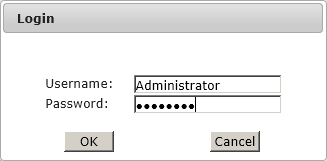
User login popup.
When user is attempting to login, browser shall prompt user a standard login dialog. User shall then key in user name (case sensitive) and password (case sensitive) and press OK to login. If the supplied user name or password is incorrect, browser will prompt the login window for another two times. User need to click on login button again to call out login window if fail to login for three attempts continuously.
- Name
-
A case sensitive user name.
- Description
-
Additional description.
- Password
-
A case sensitive password.
- Expire
-
Expiry date in DD-MM-YYYY format. Enter 01-01-9999 in year for non-expiry user.
- Maximum Instances
-
Security feature that defined user maximum login instances or session at the same time in multiple locations.
![[Important]](images/important.png) Important
Important
Expiry column must not left blank, otherwise user will not be able to login.